Disclosure Checklist
Runs your firm's disclosure checklist items as instructions against the current-year statement. Each item becomes a discrete check that the AI evaluates with a citation, so the checklist is reviewed in one pass rather than item by item by hand.
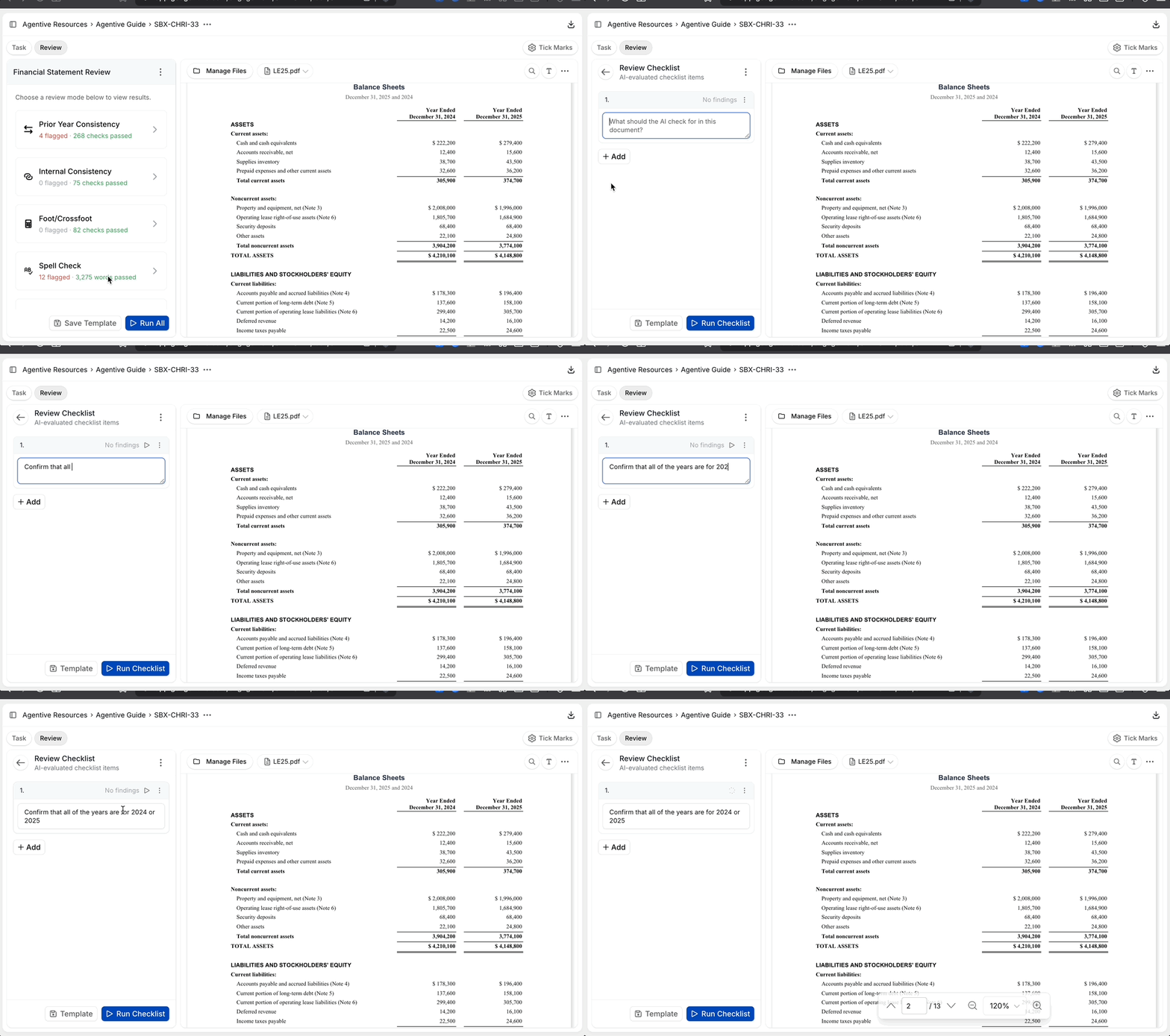
The Disclosure Checklist is the FSR mode that converts your firm's disclosure checklist into a set of instructions and runs them against the current-year financial statement. Each checklist item becomes a discrete check (for example, "Are year-end dates accurate throughout the document?" or "Is the standard going-concern disclosure present and consistent with the current period?"), and the AI evaluates it against the document, returning a tickmark with reasoning and a citation.
The mode comes pre-populated with a standard checklist. The value comes from tuning it to your firm: add the items your reviewer always asks about, edit the wording so the checks read against your firm's standard, and the same checklist runs on every FSR going forward.
Items that depend on external evidence (an amortization schedule, a quantitative workpaper) won't resolve automatically. Those get reviewed by hand and the tickmark is locked once you've done the work.
What it inspects
Standard required disclosures
Going-concern, subsequent events, revenue recognition policy, significant accounting policies, related-party transactions, and other standard disclosure items.
Period and date accuracy
Year-end dates referenced throughout the document, comparative period labeling, and the dates on the auditor's report.
Firm standard language
Standard disclosure paragraphs the firm requires (e.g., basis of presentation, use of estimates), present, consistent with the current period, and unchanged from the firm template where applicable.
Engagement-specific items
Items you add to the checklist for the specific engagement (e.g., a particular contingency that needs disclosure, an industry-specific footnote).
Cross-references and footnote numbering
Footnote references in the face of the statement that point to the right footnote number.
Tune the checklist
The default checklist is a starting point. The mode is most valuable when you've added the items your firm always reviews and refined the wording so each check is precise.
Edit a checklist item
Click into any existing item on the mode and edit the instruction. Treat the wording like an AI prompt: be specific about what to look for, where to look, and what counts as a pass.
Add an item
Click + Add Item and write a new check. Two items most firms add on every engagement:
- "Are year-end dates accurate throughout the document, including the auditor's report, footnote headers, and comparative period labels?"
- "Is the firm's standard going-concern / basis-of-presentation language present and consistent with the current period?"
Re-run the mode
Click the play icon on the mode to rerun with the updated checklist. New items run, edited items re-evaluate, and locked tickmarks are preserved.
Once your firm has a tuned checklist, save the instructions in a document your team can paste into every new FSR. Over time, this becomes one of the higher-leverage assets in your FSR workflow.
Tips
- Walk it after the math modes. Disclosure Checklist often references totals, dates, and figures that are cleaner to evaluate once Footing and Internal Consistency have already cleared.
- Add items as you find them. Anytime a reviewer asks "did anyone check X?" on a partner review, add that question to the checklist. The next FSR catches it automatically.
- Lock everything. Even the items the AI passes automatically should be locked once a human has agreed with the conclusion; the lock is the documented review.
A well-tuned Disclosure Checklist is the FSR mode that most directly mirrors your firm's quality-control review. The instruction list is the procedure; the locked tickmarks are the documentation that the procedure was performed. Store the firm-wide version of your checklist alongside templates in Engagement Settings, and revisit the Spell Check, Grammar, and Prose instruction so the qualitative pass matches your standard too.
Continue your journey
← Spell Check, Grammar, and Prose
Tune the qualitative review to your firm's standard.
EBP Engagements →
Run an end-to-end Employee Benefit Plan audit with Agentive's EBP templates.
How is this guide?
Spell Check, Grammar, and Prose
Flags spelling errors, grammatical issues, inconsistent prose, and other qualitative findings across the financial statement. Driven by an editable instruction you tune to your firm's standard so the mode returns the issues you care about and skips the noise you don't.
Run an EBP engagement with Agentive
Set up and run an Employee Benefit Plan audit with Agentive's EBP templates. Roll forward the baseline, publish plan provisions as Engagement Variables with the EBP Plan Analysis, tailor procedures to your client's documents with Co-Audit, and fine-tune accounting policies so each year's run is cleaner than the last.