Footing and Cross-Footing
Verifies that column totals sum vertically and row totals sum horizontally across every schedule in the financial statement. Orientation is detected automatically. Typically where FSR saves the most time versus manual review.
Footing and Cross-Footing is the FSR mode that recomputes every total in the financial statements (column totals summed vertically for footing and row totals summed horizontally for cross-footing) and flags any total that doesn't tie. It runs across the face of the statement, the supplementary schedules, and the footnote tables. Orientation is detected automatically; you don't tell it which way to sum.
This is usually the highest-leverage mode in FSR. Manual footing of a long roll-forward schedule is the most tedious part of a financial statement review, and it's exactly the kind of mechanical check the AI is reliable at.
What it inspects
Vertical footing
Column totals: the sum of each component line up to the subtotal and total at the bottom of a column.
Horizontal cross-footing
Row totals: the sum of each row across the columns to the total in the rightmost column.
Roll-forward schedules
Beginning balance + additions − reductions = ending balance, across PP&E, intangibles, equity, AROs, leases, debt, and similar schedules.
Subtotal hierarchies
Nested subtotals (e.g., subtotal of operating expenses, then total expenses, then operating income) computed level by level.
Total = sum of components
A grand total compared to the explicit components disclosed in the same schedule.
Manual footing fallback
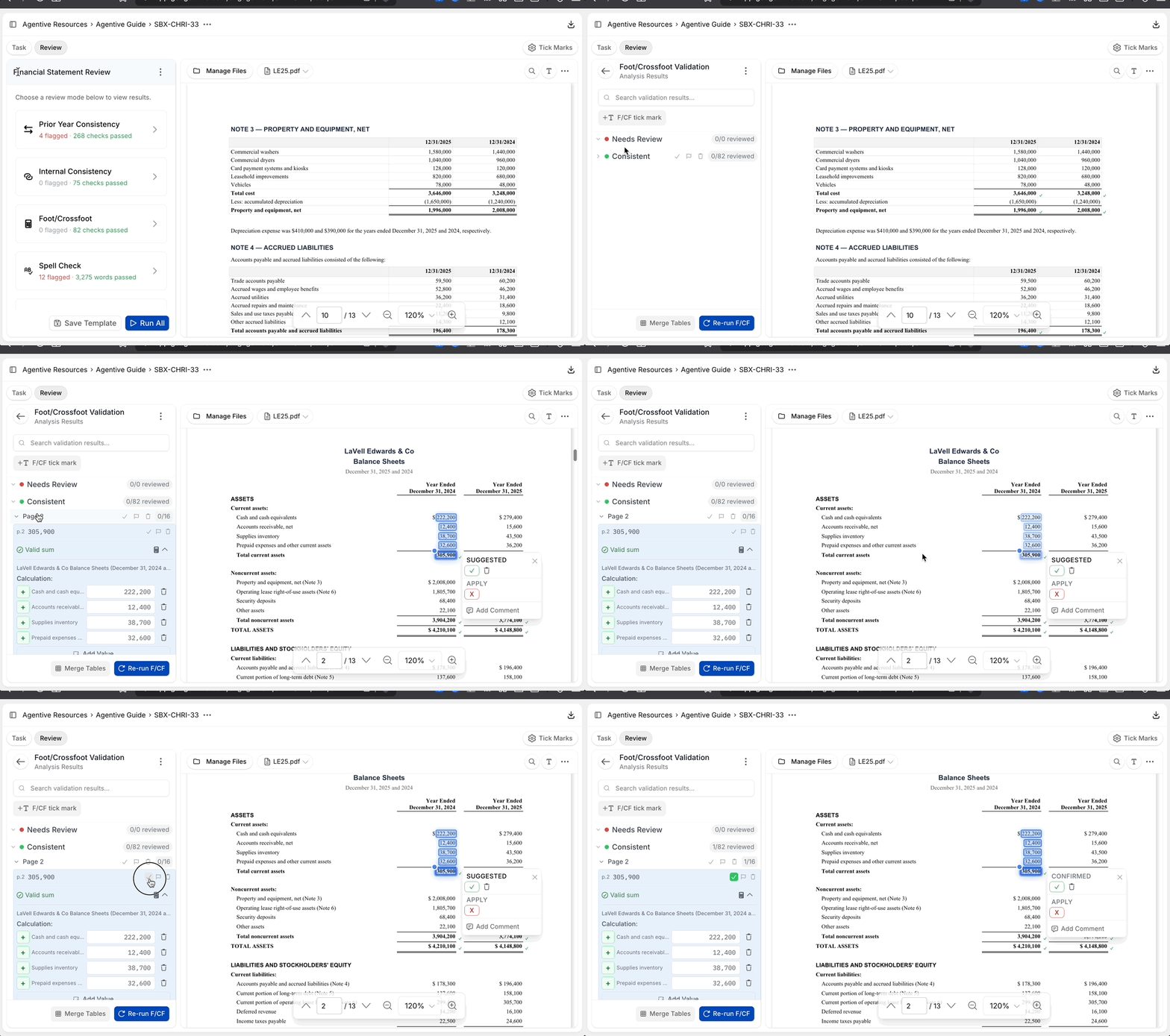
When the automated result doesn't load, or when Agentive picked up the wrong components, you can foot a total manually right inside FSR.
Click the Footing tickmark on the total
Click the tickmark on the total line you want to check. The line is selected.
Click each component
Hold and click each component value (e.g., cash, receivables, inventory) to add it to the selection. The running sum updates as you click.
Click Apply
Agentive checks the components against the total and stamps the result: a check if the values agree, an X if they don't.
The manual footing flow is also how you document a footing the AI couldn't reach (for example, a calculated subtotal that depends on a separately-disclosed adjustment). Mark it manually and lock the tickmark to record the work. When a footing question depends on supporting workpapers, jump to the Workpaper tab to confirm the inputs, or open Co-Audit to ask about the schedule directly.
Continue your journey
← Internal Consistency
Catch the same figure disagreeing across the document.
Spell Check, Grammar, and Prose →
Flag spelling, grammar, and prose issues with an editable instruction.
How is this guide?
Internal Consistency
Detects when the same number appears with a different value in more than one place within the current-year statement, including subtotals that disagree with footnote references, schedules that don't tie to the face of the statement, and figures repeated inconsistently across the document.
Spell Check, Grammar, and Prose
Flags spelling errors, grammatical issues, inconsistent prose, and other qualitative findings across the financial statement. Driven by an editable instruction you tune to your firm's standard so the mode returns the issues you care about and skips the noise you don't.