Financial Statement Review
The Financial Statement Review (FSR) task runs five review modes against the prior- and current-year financial statements (Prior Year Consistency, Internal Consistency, Footing and Cross-Footing, Spell Check, and Disclosure Checklist) and surfaces every finding with a citation back to the source.
The Financial Statement Review (FSR) is a dedicated task type in Agentive that runs the prior- and current-year financial statements through five automated review modes in parallel. Each mode looks at the statements from a different angle (period-over-period consistency, internal consistency, footing, spelling and grammar, and your firm's disclosure checklist) and flags every finding with a citation that jumps you straight to the source page.
FSR is internal-only. The task lives on the Task Board (not the client-facing Request Board) and creating one will turn the Task Board on if it isn't already.
What you'll learn
- What an FSR task is and where it lives in an engagement.
- How to create an FSR and upload the prior- and current-year statements.
- The review modes and what each one inspects.
Create an FSR task
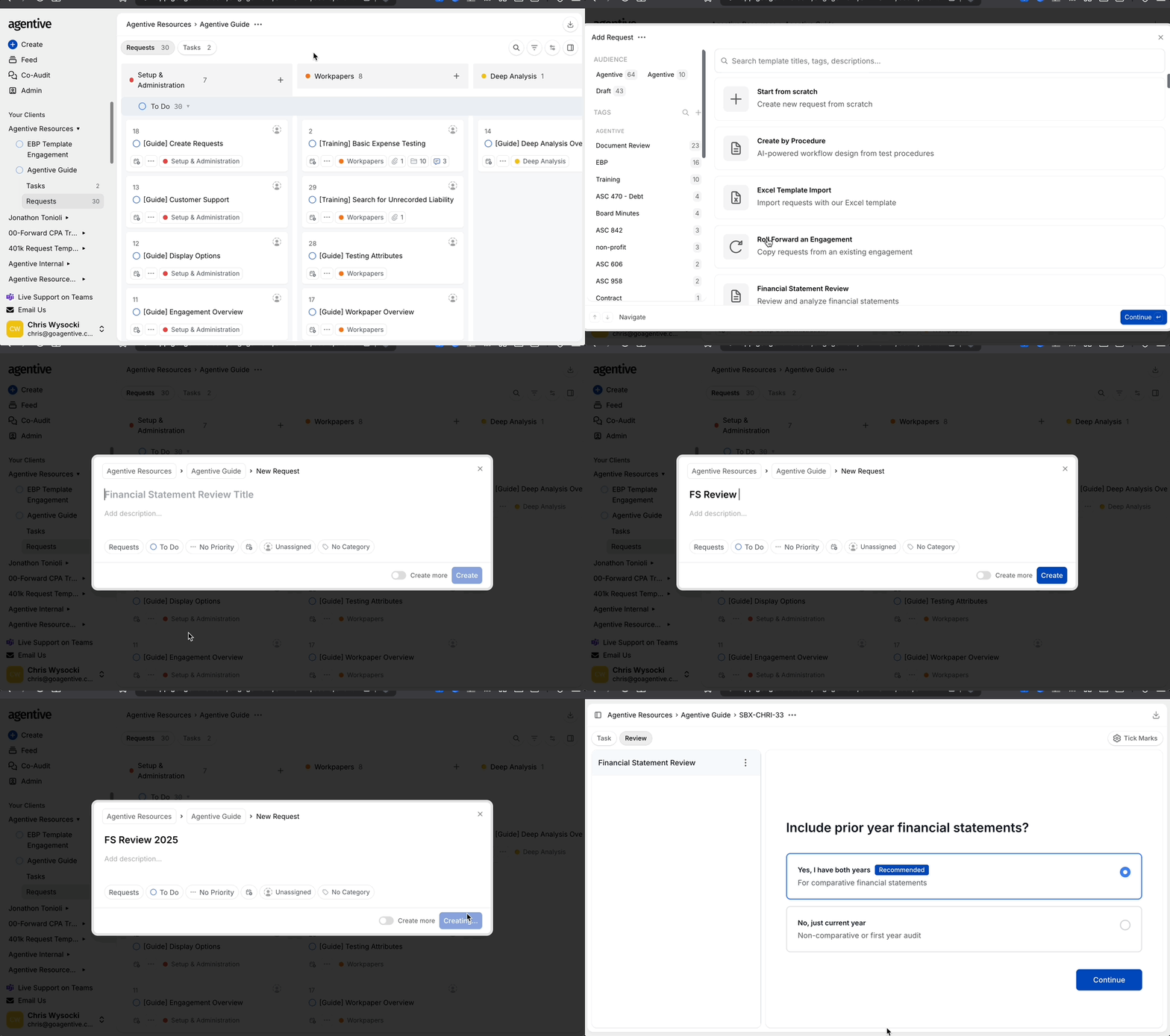
Open + Create on the Task Board
From inside the engagement, click + Create at the top left and select Financial Statement Review. If the engagement does not yet have a Task Board, creating the FSR turns it on automatically.
Title the task
Give it a clear, versioned name like 2025 Financials v1. You'll usually run a v2 and v3 against later drafts of the statements, so build the versioning in from the start.
Click Continue
The FSR task opens straight to the two-step document upload.
FSR tasks always live on the Task Board. They are internal-only and never visible to the client. See The Request Board for the difference between the two boards.
Upload the statements
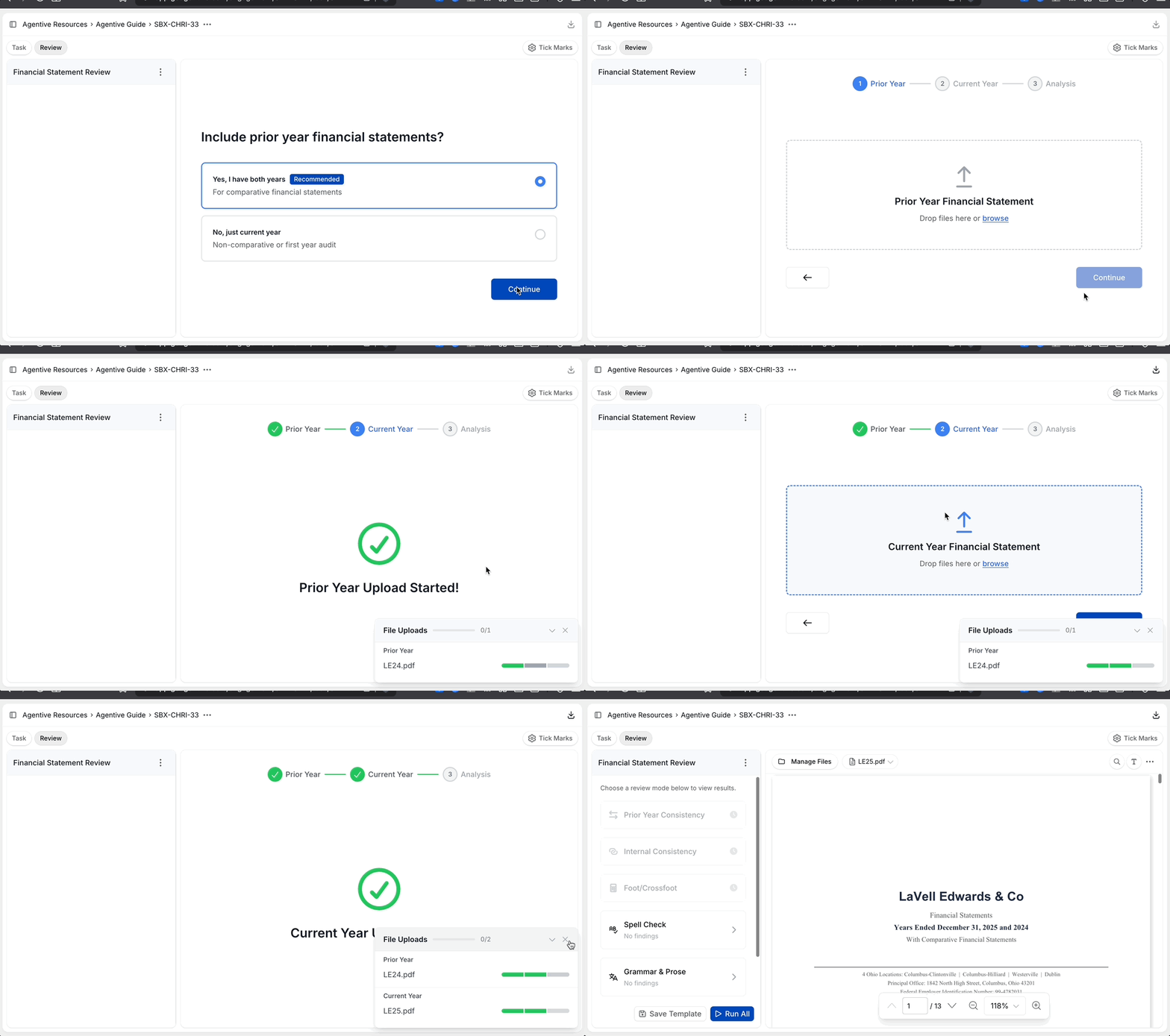
Upload the prior-year statement
Drop in last year's signed financial statements as the prior-year file. This is what the Prior Year Consistency mode reads against.
Upload the current-year statement
Drop in this year's draft financial statements as the current-year file. This is the document every mode evaluates and flags.
Wait for processing
Agentive's agents read both PDFs, align the structure, and run all five modes in parallel. The results page opens automatically when processing finishes.
Use the final draft PDF, not a Word doc or a scanned image. FSR depends on the structured text in the PDF to align line items between years and to compute footings. Scanned image PDFs work but degrade accuracy.
The review modes
Each mode reads the same statements from a different angle and produces its own set of tickmarks. Open any flagged item to see Agentive's reasoning and a citation that jumps straight to the source page.
Prior Year Consistency
Compares the current- and prior-year statements line by line and flags differences, reconciling line items that were reordered or relabeled.
Internal Consistency
Catches when the same number appears with a different value in more than one place within the current-year statement: subtotals, footnote references, and supplementary schedules.
Footing and Cross-Footing
Verifies that column totals sum vertically and row totals sum horizontally. Orientation is detected automatically. Usually where FSR saves the most time.
Spell Check, Grammar, and Prose
Flags spelling errors, grammatical issues, and inconsistent prose. Driven by an editable instruction you tune to your firm's standard.
Disclosure Checklist
Runs your firm's checklist items against the statement as instructions and flags anything missing, inconsistent, or out of period.
Leave comments on the statements
Beyond the tickmarks Agentive generates, you can add your own comments anywhere on the financial statements to record review notes, flag items for a partner, or document the resolution of a finding in place. Comments stay anchored to the spot on the page you placed them and travel with the document on export.
Add a comment
Click anywhere on the statement to drop a comment pin, then type your note. Comments are attributed to you and timestamped automatically.
Reply, edit, or resolve
Teammates on the engagement can reply to your comment to build a thread. Edit your own comments at any time, or mark a thread as resolved once the conversation is closed.
Export to PDF
When you export the reviewed statements, every comment is written into the PDF as a native PDF comment anchored to the same location on the page. The exported file opens in Adobe Acrobat, Preview, or any standard PDF reader with the comments visible, with no Agentive account required.
PDF comments on export make FSR comments a durable workpaper artifact: reviewers, partners, and clients can read the full comment trail in the PDF itself, even after the engagement closes. For a guided walkthrough of your first FSR, see the Onboarding FSR guide, or pair the review with Co-Audit to query the same statements conversationally.
Continue your journey
← Excel Add-In
Install the Add-In to keep source documents one click away in Excel.
Prior Year Consistency →
Compare current and prior-year statements, even when lines were reordered or relabeled.
How is this guide?
The Excel Add-in
Install the Agentive Excel add-in on Windows in one continuous flow: set up Trusted Sites, download the installer, run setup.exe, sign in, and pick the engagement.
Prior Year Consistency
Compares the current- and prior-year financial statements line by line and flags differences. Reconciles line items that were reordered, relabeled, or split between periods so a moved line is still matched correctly.